AWS to Azure: The Zero Data Loss Migration Plan
Moving your infrastructure from Amazon Web Services (AWS) to Microsoft Azure is one of the most significant technical undertakings a business can execute. It is rarely done lightly. While both are hyperscale cloud providers offering fundamentally similar compute and storage primitives, their architectures, networking paradigms, and Identity and Access Management (IAM) philosophies are radically different.
For UK SMEs and mid-market organisations, the decision to migrate is usually driven by strategic Microsoft alignment (such as heavily utilising Office 365 or Active Directory), aggressive pricing incentives, or compliance requirements.
This guide outlines a highly structured, risk-averse methodology for migrating workloads from AWS to Azure, ensuring zero data loss and minimal operational downtime.
Key Takeaways
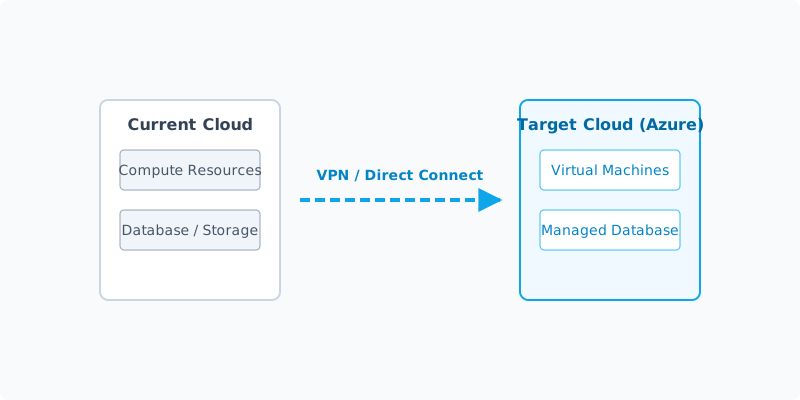
- Networking First: Do not move a single VM until your Azure Virtual Network (VNet) is fully configured and connected to your AWS VPC via a Site-to-Site VPN.
- IAM Re-Architecture: AWS IAM policies do not map 1:1 with Azure RBAC (Role-Based Access Control). This requires complete redesign, not a simple copy-paste.
- Refactor vs Rehost: Lift-and-shift (Rehosting) is fastest, but refactoring (e.g., moving from AWS RDS to Azure SQL Database) yields better long-term performance and cost savings.
- The Rollback: Never execute a cutover without a documented, tested rollback plan to revert to AWS within 15 minutes.
Table of Contents
- Why Businesses Migrate (Drivers & Anti-patterns)
- The Multi-Cloud Alternative (Connect vs Switch)
- Pre-Migration Assessment & Mapping
- Step-by-Step Execution Plan
- Data Migration Strategies
- Troubleshooting Common Issues
- Cost Modeling & TCO
- Frequently Asked Questions
Why Businesses Migrate (Drivers & Anti-patterns)
Before committing to a migration, ensure your reasoning is sound.
Valid Drivers:
- Microsoft Enterprise Agreement (EA): You have negotiated significant discounts across the Microsoft stack (M365, Dynamics, Azure), making AWS financially uncompetitive.
- Active Directory Integration: Deep reliance on Windows Server and Active Directory often makes Azure a more natural, seamless environment.
- Specific PaaS Requirements: Your dev team requires specific Azure platform services (like Azure App Service or Azure Kubernetes Service) that they prefer over AWS equivalents.
Anti-Patterns (When NOT to migrate):
- “Azure is cheaper.” List prices are similar. Without an EA or Azure Hybrid Benefit, the cost of the migration project itself will wipe out any minor unit-cost savings.
- “Our new CTO prefers Azure.” Migrating purely based on executive familiarity is a recipe for wasted engineering cycles.
The Multi-Cloud Alternative (Connect vs Switch)
Before executing a full lift-and-shift, consider a Multi-Cloud Architecture.
Instead of turning AWS off, you can establish a secure, high-speed connection between AWS and Azure (using AWS Direct Connect / Azure ExpressRoute via a provider like Megaport, or a robust Site-to-Site VPN).
The Connect Strategy: You might keep your legacy Linux workloads and complex S3 data lakes on AWS, but deploy all new .NET applications and SQL Server databases on Azure. By connecting the two environments at the network layer, they function as one logical data centre. This drastically reduces migration risk, though it does increase network egress costs and management overhead.
Pre-Migration Assessment & Mapping
A successful migration is 80% planning and 20% execution. You must map every AWS service to its Azure equivalent.
Service Mapping Blueprint
| AWS Service | Azure Equivalent | Migration Complexity |
|---|---|---|
| EC2 (Virtual Machines) | Azure Virtual Machines | Low (Use Azure Migrate) |
| VPC (Networking) | Azure VNet | Medium (Design required) |
| S3 (Object Storage) | Azure Blob Storage | Low (Use AzCopy) |
| RDS (Managed Database) | Azure SQL Database / Database for PostgreSQL | High (Schema/Data sync needed) |
| IAM (Identity) | Azure Entra ID / RBAC | High (Total redesign) |
| Lambda (Serverless) | Azure Functions | High (Code changes required) |
The Discovery Phase
Use a tool like Azure Migrate to scan your AWS environment. It will assess the readiness of your EC2 instances, identify dependencies (e.g., VM A talks to Database B), and provide cost estimates for running those workloads in Azure.
Step-by-Step Execution Plan
Phase 1: The Azure Foundation (Landing Zone)
Do not migrate workloads into an empty Azure subscription. You must build a "Landing Zone."
- Identity: Set up Microsoft Entra ID (formerly Azure AD) and configure Role-Based Access Control (RBAC).
- Networking: Create your Azure VNet, subnets, and Network Security Groups (NSGs).
- Connectivity: Establish the VPN connection between your AWS VPC and the new Azure VNet. Ensure routing tables allow traffic to flow between them.
Phase 2: Pilot Migration
Select a low-risk, non-mission-critical application (e.g., an internal staging environment).
- Replicate the EC2 instance to an Azure VM.
- Update DNS internally to point to the new Azure IP.
- Validate that the application functions correctly and can communicate with its database (which may still be in AWS during this test).
Phase 3: The Data Gravity Challenge
Move your heaviest data first.
- Databases: Use the Azure Database Migration Service (DMS) to create a continuous replica of your AWS RDS database into Azure.
- Storage: Use AzCopy or Azure Data Factory to move S3 buckets to Azure Blob Storage.
Phase 4: The Cutover
Schedule a maintenance window.
- Put the application in AWS into "Read-Only" mode.
- Allow the final database delta sync to complete via Azure DMS.
- Break the replication (making the Azure database the primary).
- Boot up the Azure VMs.
- Update global DNS (Route53/Cloudflare) to point traffic to the Azure Load Balancer.
- Verify application health.
Data Migration Strategies (Zero Data Loss)
To achieve zero data loss, you cannot rely on simple backups. You must use continuous replication.
If you are migrating a high-traffic MySQL database on AWS RDS to Azure Database for MySQL, you set up the Azure database as a "Read Replica" of the AWS database. The data streams across the VPN in real-time. During the cutover window, you stop writes to AWS, wait 30 seconds for the final bytes to replicate, and then promote the Azure database to "Master".
Troubleshooting Common Issues
- Asymmetric Routing: If traffic goes out through AWS but tries to return via Azure, firewalls will drop the packets. Ensure your BGP routing over the VPN is correctly prioritised.
- Disk IOPS Throttling: AWS EBS volumes and Azure Managed Disks calculate IOPS (input/output operations per second) differently. An application that runs fine on AWS might suddenly run slowly on Azure if you chose a disk tier with insufficient IOPS. Always monitor disk queues during the pilot.
- Hidden Egress Costs: AWS charges for data leaving its network. When you migrate terabytes of data from S3 to Azure, you will receive a substantial data egress bill from AWS. Factor this into your migration budget.
Cost Modeling & TCO
To accurately model costs, you must utilise the Azure Hybrid Benefit. If you already own Windows Server or SQL Server licences with active Software Assurance, you can apply them to Azure VMs, reducing compute costs by up to 40%.
Furthermore, commit to 1-year or 3-year Reserved Instances for steady-state workloads immediately after verifying the migration. Running pay-as-you-go VMs indefinitely will destroy your cloud budget.
We may earn a commission if you sign up through this link.
Frequently Asked Questions
How long does a migration take? For an SME with 20-50 servers, the planning phase takes 4-6 weeks, the pilot takes 2 weeks, and the execution is phased over 2-4 weekends.
Should we use a migration partner? If you do not have in-house engineers who hold both AWS and Azure architect certifications, hiring a Microsoft Gold Partner for the migration is highly recommended. The cost of misconfiguring security in the cloud far exceeds partner fees.
What is the rollback plan? During the cutover, you do not delete the AWS resources. You simply stop the EC2 instances. If the Azure deployment fails catastrophically, your rollback plan is to update DNS to point back to AWS, restart the EC2 instances, and reverse the database replication. You should test this rollback procedure during the pilot phase.