The Advanced Guide to Switching from Mailchimp to SendGrid
For many growing SMEs, Mailchimp is the natural starting point for email marketing. Its intuitive drag-and-drop interface and "all-in-one" marketing platform approach are excellent for startups. However, as your business matures, you may find that Mailchimp’s pricing model—which charges based on total contacts, including those who never engage—becomes a significant overhead, especially for high-volume transactional emails.
Transitioning to Twilio SendGrid represents a shift from a marketing-first "all-in-one" tool to a developer-friendly, infrastructure-heavy platform. While SendGrid offers superior deliverability and granular API control, the migration process is not a "click-and-go" affair. This guide provides a risk-managed framework for moving your operations without disrupting your revenue streams or breaking your existing tech stack.
We also explore the modern approach: API connection over wholesale replacement. You don't necessarily have to abandon Mailchimp for marketing if you route your critical transactional emails via SendGrid's robust APIs.
Key Takeaways
- Transactional vs Marketing: You can run SendGrid for transactional emails while keeping Mailchimp for newsletters to get the best of both worlds.
- API First: SendGrid requires more technical setup but offers unparalleled reliability for password resets and order confirmations.
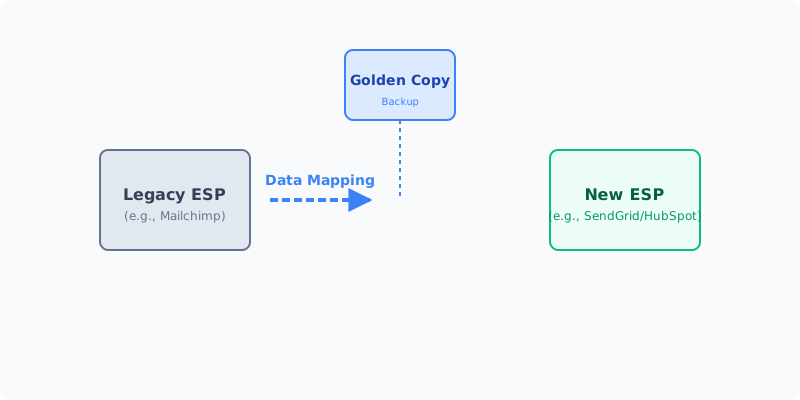
- Golden Copy: Always export a complete CSV of your suppression lists before initiating any migration to avoid immediate spam complaints.
- Warm-up Period: Moving to a dedicated IP on SendGrid requires a strict 30-day warm-up schedule to protect your sender reputation.
Table of Contents
- Why Companies Switch: The Trigger Points
- The Hybrid Approach: Connecting Rather Than Switching
- Migration Risk Assessment
- Pre-Migration Checklist
- The Step-by-Step Migration Process
- Common Pitfalls & How to Avoid Them
- UK GDPR Considerations
- Cost Breakdown
- Frequently Asked Questions
Why Companies Switch: The Trigger Points
Businesses typically migrate from Mailchimp to SendGrid when they hit specific ceilings that throttle their growth or unnecessarily inflate their operational costs.
1. The Cost-Per-Contact Trap
Mailchimp’s pricing scales with your audience size. If you maintain a large list of inactive subscribers or use the platform primarily to fire off transactional receipts to millions of one-time buyers, you are paying a premium for dead weight. SendGrid’s pricing is inherently different; it focuses on the volume of emails sent rather than the number of contacts stored in a CRM database. For high-volume transactional senders, this switch can slash monthly bills by up to 60%.
2. Deliverability Requirements
If your business model relies heavily on transactional emails—such as two-factor authentication codes, password resets, or order confirmations—you need an infrastructure that treats these with absolute priority. A marketing email arriving 10 minutes late is acceptable; a password reset arriving 10 minutes late results in a lost customer. SendGrid’s SMTP relay is the industry standard for ensuring these critical emails bypass the spam folder and land immediately in the inbox.
3. API and Integration Depth
Mailchimp is fundamentally designed for marketers who prefer visual builders over writing code. However, if your internal development team needs to trigger emails based on complex, real-time user behaviour (e.g., a specific sequence of button clicks in a custom web application), Mailchimp's automations can feel rigid. SendGrid’s API-first architecture offers superior, granular control. Developers can inject dynamic data into templates via JSON payloads seamlessly.
We may earn a commission if you sign up through this link.
The Hybrid Approach: Connecting Rather Than Switching
Before committing to a full migration, consider whether you actually need to switch. Many enterprise companies use a hybrid architecture:
- Mailchimp for Marketing: The marketing team retains Mailchimp to design newsletters, manage promotional campaigns, and utilise the drag-and-drop journey builder.
- SendGrid for Transactional: The engineering team connects the application backend to SendGrid's Email API for all system-generated notifications.
How to connect them: Instead of a messy migration, you can use middleware like Zapier, Make, or custom webhooks. When a user creates an account, your app triggers a transactional welcome email via SendGrid, and simultaneously adds that user's email address to a specific Mailchimp audience list for future marketing.
This approach completely isolates your transactional sender reputation from your marketing sender reputation—a best practice recommended by almost all deliverability experts.
Migration Risk Assessment
If a full migration is necessary, it must be treated as a "Medium to High Risk" IT project. The primary threats to your business continuity include:
- Downtime of Critical Systems: If your SMTP credentials or API keys are misconfigured during the cutover, transactional emails stop sending immediately. This breaks user registration flows and purchase confirmations.
- Data Integrity Loss: Mapping custom fields (merge tags) from Mailchimp’s proprietary database structure (e.g.,
*|FNAME|*) to SendGrid’s Handlebars syntax (e.g.,{{first_name}}) is notoriously error-prone. - Sender Reputation Damage: Moving from a "warm" shared IP address on Mailchimp to a new infrastructure requires a delicate "warm-up" period. Jumping straight into high-volume sending on a new SendGrid account can cause ISPs (Gmail, Outlook) to flag your legitimate mail as spam.
- Hidden Re-platforming Costs: You will lose access to Mailchimp’s pre-built landing pages and sign-up forms, requiring developer time to rebuild them using your CMS or SendGrid's forms.
Pre-Migration Checklist
Before you move a single contact, complete this rigorous audit to ensure your "Golden Copy" of data is secure. Do not skip these steps.
- Comprehensive Data Export: Export all lists, segments, and crucially, your suppression lists (bounced, unsubscribed, and spam complaints) from Mailchimp.
- Template Extraction: Archive your best-performing email templates. Note that Mailchimp’s proprietary drag-and-drop blocks will need to be recreated in SendGrid’s Design Editor or coded as raw HTML.
- Integration Audit Map: List absolutely every tool currently connected to Mailchimp (e.g., Shopify, WordPress, Zapier, custom CRMs). Every single one will need its webhook or API connection updated.
- Golden Copy Backup: Save your exported CSVs in a secure, encrypted, immutable folder (like a locked AWS S3 bucket or secure Google Drive).
- Schema Field Mapping: Create a spreadsheet explicitly mapping Mailchimp merge tags to SendGrid custom fields.
- DNS and Authentication Audit: Ensure you have admin access to your DNS records (Cloudflare, Route53, GoDaddy). You will need to provision new CNAME records for SendGrid’s SPF, DKIM, and DMARC authentication.
The Step-by-Step Migration Process
Phase 1: The Pilot & Infrastructure Setup
Do not move your entire list at once. Begin by configuring your sender authentication in SendGrid. Add the required DNS records and wait for propagation. Create a single, simple transactional template in SendGrid. Export a small, highly active segment from Mailchimp (e.g., internal staff or 100 engaged beta testers) and send a test campaign to ensure the DKIM signatures pass and the HTML renders correctly across mobile clients.
Phase 2: Parallel Running (The API Connection)
Keep your Mailchimp account fully active. During this 30-day window, update your application backend to route all new user registrations and transactional receipts through the SendGrid API. Monitor the SendGrid Activity Feed closely for dropped emails or bounce events.
Pro Tip: Use a feature flag in your codebase to easily toggle traffic back to Mailchimp if the SendGrid integration fails in production.
Phase 3: The Data Cutover
Once the technical pilot is flawless, migrate your master list. Crucial Step: Import your Mailchimp suppression lists into SendGrid before you import any active contacts. If you accidentally email an unsubscribed user from your new SendGrid account, you risk immediate spam complaints that will tank your new IP reputation. Once suppressions are loaded, migrate your active contacts and custom fields.
Phase 4: Post-Migration Warm-up
If you have purchased a Dedicated IP from SendGrid, you must strictly adhere to an IP Warm-up schedule. Start by sending only to your most engaged users (those who opened an email in the last 30 days) and cap your daily volume. Increase the volume by roughly 20-30% each day. Monitor your "Bounce Rate" and "Spam Report Rate" daily. If deliverability dips, pause the volume increase immediately.
Common Pitfalls & How to Avoid Them
- The "Cold IP" Deliverability Drop: SMEs often expect day-one deliverability to match Mailchimp. If you don't warm up your new infrastructure, Gmail will throttle your delivery. Solution: Use SendGrid's automated IP warm-up feature or strictly control your batch sizes via API.
- Broken Automation Workflows: Zapier or Make.com workflows do not magically update themselves. Solution: Audit every "Zap" that involves Mailchimp and manually rebuild the trigger/action to point to the SendGrid API.
- Template Rendering Issues: Mailchimp adds proprietary CSS to make templates responsive. When you export the HTML, it may break in Outlook. Solution: Run all migrated templates through a rendering testing tool like Litmus or Email on Acid before sending to customers.
UK GDPR Considerations
When moving personal data between platforms, you remain the primary "Data Controller" under UK law.
- Data Residency: SendGrid is a US-headquartered global provider. Ensure you have signed the Data Processing Addendum (DPA) incorporating Standard Contractual Clauses (SCCs) within your SendGrid account settings to remain compliant with UK GDPR requirements regarding international data transfers.
- Right to Erasure: Ensure your new SendGrid setup allows your support team to easily locate and permanently delete a user’s data if they exercise their "Right to be Forgotten." API automation is recommended for this.
- Consent Management Audit: You cannot "re-import" a legacy list of contacts that haven't been engaged with for years just because you changed platforms. You must have an auditable record of how those users originally opted in to comply with the Privacy and Electronic Communications Regulations (PECR).
Cost Breakdown Comparison
| Cost Category | Mailchimp (Legacy) | SendGrid (New) | Migration Cost (One-off) |
|---|---|---|---|
| Platform Subscription | Scales by Total Contacts (High) | Scales by Email Volume (Low) | £0 |
| Dedicated IP | Included in Premium (£250+/mo) | Add-on for Pro plans (£70/mo) | £0 |
| Developer Integration Time | Low (Visual tools) | High (API webhooks setup) | £1,000 - £3,500 (Agency/Contractor) |
| Template Rebuilding | £0 | £0 | £300 - £800 (HTML Dev) |
Note: While the upfront developer cost to integrate SendGrid's API is notable, the long-term monthly savings on a large contact list typically yield a positive ROI within 4-6 months.
We may earn a commission if you sign up through this link.
Frequently Asked Questions
Can I run Mailchimp and SendGrid at the same time? Yes. In fact, it is highly recommended. Many businesses use SendGrid's SMTP relay for application alerts and password resets, while the marketing team continues to use Mailchimp for monthly newsletters.
Will my custom tracking links break? If you use a custom domain for your click-tracking links in Mailchimp, you will need to re-authenticate and configure Link Branding in SendGrid. Do not use shared tracking links, as they negatively impact deliverability.
Does SendGrid have a drag-and-drop editor like Mailchimp? Yes, SendGrid offers a "Design Editor" for marketers. While it has improved significantly, many users still find Mailchimp's visual builder to be slightly more intuitive for complex layouts.
How long does a safe migration take? For an SME with a standard web application, expect 2–4 weeks. This includes 1 week for API integration, 1 week for template migration and testing, and a 2-week IP warm-up period.