A Strategic Guide to Migrating from MailerLite to Mailchimp
Disclosure: This guide is provided for informational purposes. While we may receive commissions from some of the links provided, this does not influence our objective analysis of software capabilities or migration risks.
1. Introduction
Switching your email marketing platform is a significant operational decision. Whether you are moving from MailerLite to Mailchimp due to the need for advanced automation, deeper CRM integrations, or improved reporting analytics, the transition must be handled with precision.
Many SMEs fear that migrating customer databases will result in data loss or the corruption of historical engagement metrics. While these concerns are valid, the transition between these two specific platforms is generally considered low-risk. By following a structured, data-driven approach, your business can ensure continuity and maintain your sender reputation throughout the process.
2. Why Companies Switch
Understanding the "why" behind your move helps in setting clear KPIs for the new platform.
- Advanced Automation: Mailchimp offers a more robust "Customer Journey Builder," which is often the primary driver for SMEs looking to scale beyond simple autoresponders.
- CRM Ecosystem: If your business relies on specific e-commerce plugins or niche B2B tools, Mailchimp’s marketplace of over 300+ integrations often provides broader compatibility.
- Reporting Complexity: Organisations moving from MailerLite often cite a need for more granular "Comparative Reporting," which allows for side-by-side performance analysis of multiple campaigns.
- Trigger Events: Common triggers include reaching the functional ceiling of MailerLite’s tier, the need for advanced A/B testing, or the consolidation of marketing stacks under a single vendor.
3. Migration Risk Assessment
The inherent risk of this migration is low, provided you avoid "data drift."
| Risk Factor | Severity | Mitigation Strategy |
|---|---|---|
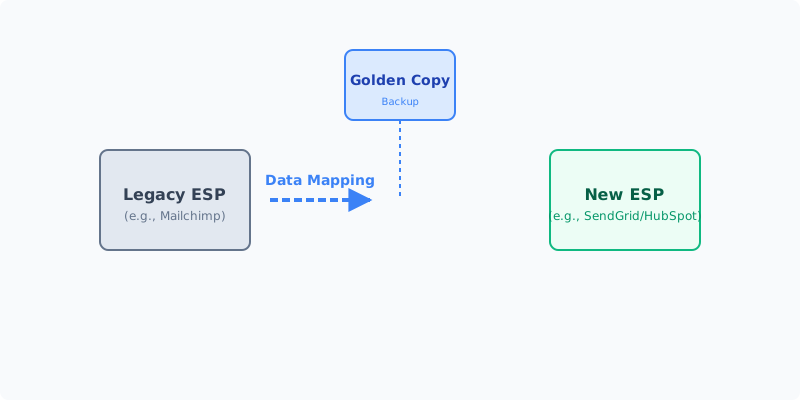
| Data Loss | Low | Perform a "Golden Copy" export before any action. |
| Downtime | Low | Use parallel running to ensure no gaps in communication. |
| Cost | Medium | Budget for overlapping subscription periods. |
| Complexity | Low | Standard CSV/API imports are well-documented. |
The primary threat is not the technology itself, but human error during field mapping. Misaligning custom fields—such as "Last Purchase Date" or "Customer Lifetime Value"—can break your segmentation rules in the new environment.
4. Pre-Migration Checklist
Before you touch the settings in either account, complete this audit:
- The Golden Copy: Export all contacts, including unsubscribed and bounced lists, from MailerLite as a CSV/Excel file. Save this to a secure, encrypted local drive.
- Audit Your Fields: List every custom field used in MailerLite. Ensure these match the intended schema in Mailchimp.
- Template Inventory: Identify your top-performing email templates. Note that code-based templates may not translate 1:1; you may need to rebuild these using Mailchimp’s drag-and-drop editor.
- Integration Audit: Document every third-party tool (e.g., Shopify, Typeform, Zapier) connected to MailerLite.
- Segment Mapping: Document the logic behind your existing segments so they can be replicated in Mailchimp’s "Tags" or "Segments" feature.
5. Step-by-Step Migration Process
Phase 1: Pilot
Select a small, non-critical list (e.g., an internal test list or a small segment of 50 contacts). Import these to Mailchimp and trigger a test campaign to verify that custom fields populate correctly.
Phase 2: Parallel Running
Keep both accounts active for 14 days. If your signup forms are embedded on your website, prepare to swap the code snippets. Use this time to ensure your domain authentication (DKIM, SPF, DMARC) is configured in Mailchimp to avoid deliverability issues.
Phase 3: Full Migration
Once the pilot is successful, export your full database from MailerLite. Import this into Mailchimp. Ensure you include your "Suppression List" (unsubscribes and bounces) to prevent accidental emailing of individuals who have opted out.
Phase 4: Post-Migration
Monitor your "Bounce Rate" for the first three campaigns. If you see a spike, it may indicate an issue with how the data was cleaned or mapped. Review your automation workflows to ensure they are firing as expected.
6. Common Pitfalls & How to Avoid Them
- The "Suppression" Oversight: Failing to import your list of unsubscribed users is a violation of GDPR and a recipe for spam complaints. Always import your suppression list first.
- Broken Links: When moving, check your footer links and social media icons. They often contain hard-coded references to the old platform’s tracking.
- Metric Loss: Remember that historical campaign performance (open rates/click rates) does not migrate. Export these as a PDF/CSV report from MailerLite and archive them for your records before closing the account.
7. UK GDPR Considerations
As a UK-based business, you must ensure compliance throughout the transition:
- Data Residency: Both platforms are global, but ensure you have checked the Data Processing Agreement (DPA) settings within your new Mailchimp account to ensure adequate data transfer mechanisms (e.g., Standard Contractual Clauses).
- Consent Records: Ensure that the "Date of Consent" and "Consent Source" fields are migrated. Under UK GDPR, you must be able to prove how and when an individual opted in.
- Right to Erasure: Ensure your new system is integrated with your internal CRM so that if a user requests their data be deleted, that request is honoured across your entire ecosystem.
8. Cost Breakdown
- Direct Costs: Mailchimp’s pricing model is audience-based. Use their pricing calculator to compare your current MailerLite spend against the projected costs for your subscriber count.
- Hidden Costs: Consider the billable hours for your team to rebuild automations and templates.
- Cancellation Fees: MailerLite is usually month-to-month, but ensure you cancel at the right time in the billing cycle to avoid one last automated charge.
9. When NOT to Switch
Do not switch if:
- You are in a peak sales period: Avoid migrating during Black Friday, Christmas, or a major product launch.
- You lack internal resources: If your marketing team is currently at capacity, the time required to rebuild workflows will negatively impact your ROI.
- You are only moving for "features" you won't use: If you don't plan to utilise Mailchimp's advanced AI or CRM features, the cost increase may not be justified.
10. FAQ
Q: Will I lose my historical open rates? A: Yes. Mailchimp cannot import engagement data from another provider. Export your MailerLite reports to PDF before you cancel.
Q: Does my domain authentication carry over? A: No. You will need to update your DNS records (CNAME/TXT) to point to Mailchimp’s servers.
Q: Can I keep my MailerLite automation workflows? A: No. You must manually rebuild these in Mailchimp’s interface.
11. Next Steps
- Schedule the Migration: Choose a "quiet" week in your marketing calendar.
- Assign Roles: Appoint one person as the "Data Lead" (responsible for the CSV integrity) and one as the "Creative Lead" (responsible for template migration).
- Execute the Golden Copy: Start your backup process today.