Migrating Sage 50 Departments & Projects to Xero Tracking Categories
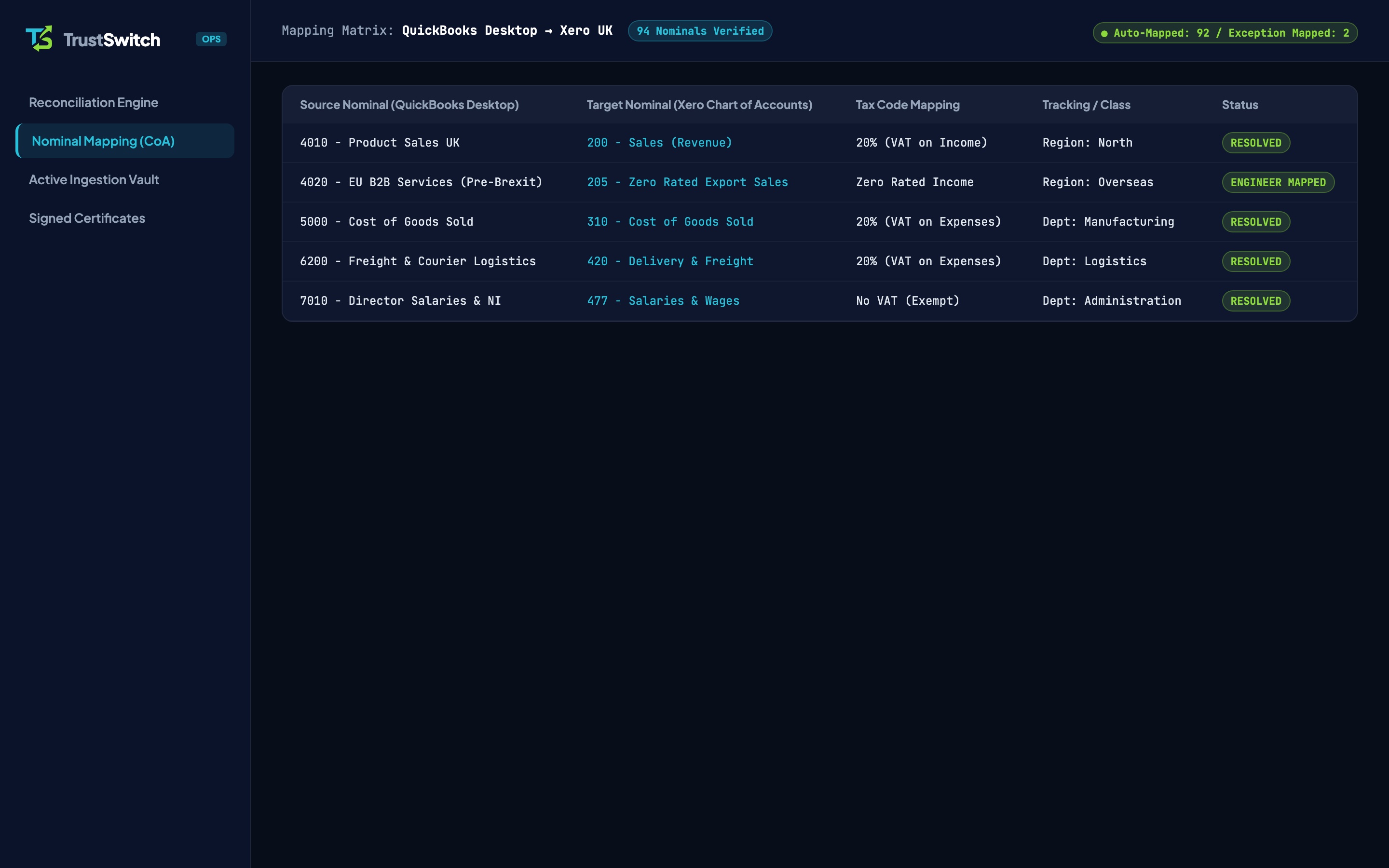
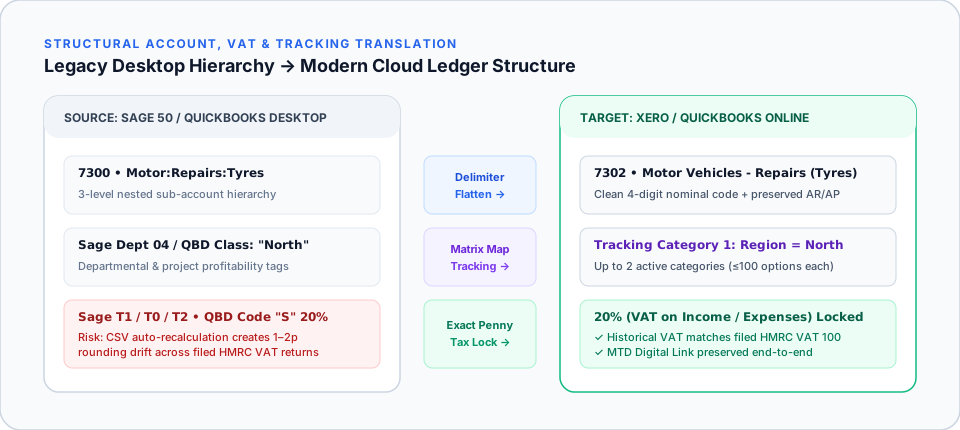
Xero does not use Sage 50’s numeric Department codes (0–999) or desktop Project Costing module directly; instead, departmental profitability maps to Xero Tracking Categories (up to 2 active categories, ≤100 options each) while live time-and-cost job tracking uses Xero Projects or specialist construction add-ons. Standard CSV exports strip Sage departmental tags from historical audit-trail lines unless extracted directly from your `.001`/`.cab` backup.
In this guide (5 sections)
Key Takeaways
Quick Summary- Sage Departments → Xero Tracking
- Active Sage 50 Departments (0–999) map cleanly to Xero Tracking Category 1, preserving multi-year departmental P&L comparisons.
- Sage Projects distinction
- Sage 50’s Cost Codes / Project module is non-nominal sub-ledger costing; active jobs should be mapped either to Tracking Category 2 (if ≤100 active jobs) or Xero Projects.
- 100-option housekeeping
- If you have 400 historic Sage project numbers from 2018–2023, group closed legacy jobs while keeping live projects distinct so Xero reports stay fast.
- Why CSV exports drop departments
- Importing summary opening balances or plain Xero invoice CSVs without exact Tracking column headers wipes out historical cost-centre reporting.
- Construction CIS compatibility
- Xero natively supports UK Construction Industry Scheme (CIS) deductions and Domestic Reverse Charge VAT alongside departmental Tracking.
How Do Sage 50 Departments & Projects Map Into Xero?
Sage 50 Accounts separates cost-centre reporting into two distinct desktop tools: numeric Departments (000–999) attached directly to nominal ledger lines, and the optional Projects (Job Costing) sub-ledger[2]. Xero replaces rigid numeric departments with Tracking Categories: supporting up to 2 active categories with up to 100 recommended options each[1]: while offering Xero Projects (or specialist job-costing integrations) for live timesheet and quote-to-margin tracking.
For UK construction, engineering, property, and agency firms using our Sage 50 to Xero migration service, planning this structural translation upfront preserves 100% of your historical departmental Profit & Loss reporting.
Structural Mapping Matrix: Sage 50 vs Xero
| Sage 50 Feature | How Sage 50 Stores It | Recommended Xero Target | Migration Rule |
|---|---|---|---|
Departments (000–999) | Single numeric tag per invoice, bill, or journal line | Tracking Category 1 (e.g. Department or Branch) | Map all active departments (≤100) onto every migrated historical line |
| Secondary Split (e.g. Region encoded in Nominal) | Duplicated nominal codes (4001 Sales North, 4002 Sales South) | Tracking Category 2 (Region) + clean single 4000 Sales nominal | Optional CoA streamlining during Statutory/Complete migration |
| Active Sage Projects (≤100 live jobs) | Project Ref + Cost Code sub-ledger tags | Tracking Category 2 (Project / Contract) or Xero Projects | Attach active project tags to open/recent bills and sales invoices |
| High-Volume Historic Jobs (100+ closed jobs) | Hundreds of completed historic job refs since incorporation | Consolidate closed legacy jobs; track live jobs in Xero Projects / WorkflowMax | Keeps Xero Tracking cleanly beneath the 100-option performance limit[1] |
Why Manual Sage CSV Exports Wipe Out Departmental History
If you attempt to move off Sage 50 using manual flat spreadsheets (see Exporting Sage 50 to CSV for Xero), two things typically go wrong with departmental reporting:
- Untracked Opening Balances: Importing a single Trial Balance CSV into Xero’s Conversion Balances screen leaves all prior periods completely untracked, because Xero does not assign Tracking Categories directly on standard Conversion Balances. When the board asks for a Year-on-Year Profit & Loss for Department 04 (Commercial Installations), last year’s column reads £0.00.
- Dropped Journal & Credit Note Tags: Sage 50 stores department numbers across separate header and split-item tables (
AUDIT_HEADERandAUDIT_SPLIT). Basic CSV exports routinely drop split-level department tags on multi-line supplier bills and journals, leaving half your overheads sitting in "Unassigned" inside Xero.
Practical Example: Simplifying a Bloated Construction or Agency Ledger
Many long-standing Sage 50 users created dozens of duplicate nominal codes (4001, 4002, 4003... 5001, 5002, 5003) and dozens of Departments over 10 years. Moving to Xero is the ideal moment to tidy both:
- Preserve What Your Accountant Needs: Keep clear 4-digit Chart of Accounts nominal codes aligned with your statutory accounts.
- Respect the 100-Option Ceiling: Review your Sage Department list (
0–999). In practice, 95% of UK SMEs have fewer than 40 active departments. Archive unused codes and map active ones cleanly into Xero Tracking Category 1[1]. - Verify CIS & Reverse Charge VAT: For UK construction subcontractors and contractors, departmental tracking works seamlessly alongside Xero’s native CIS monthly returns and Domestic Reverse Charge VAT rates.
How TrustSwitch Delivers Intact Departmental Reporting
Upload your Sage 50 .001 Data Only Golden Copy backup. Before loading Xero, our UK specialist generates a clean Department & Project frequency table from your backup, confirms your preferred Xero Tracking Category names, applies those tags across every migrated historical line, and signs off your ledger at £0.00 Trial Balance discrepancy (compare full TCO savings in Sage 50 vs Xero Pricing UK).
Frequently Asked Questions
What is the difference between Xero Tracking Categories and Xero Projects?
Can TrustSwitch migrate all 999 Sage 50 Department codes?
Will our historical Profit & Loss by Department match Sage 50?
Is departmental tracking included in TrustSwitch’s fixed pricing?
Migrate Sage 50 Departments & Nominal Ledgers Intact
Upload your Sage 50 `.001` or `.cab` backup. We preserve your departmental profitability history and guarantee a £0.00 Trial Balance match in Xero.