How to Map QuickBooks Desktop UK VAT Codes to Xero Without Penny Variances
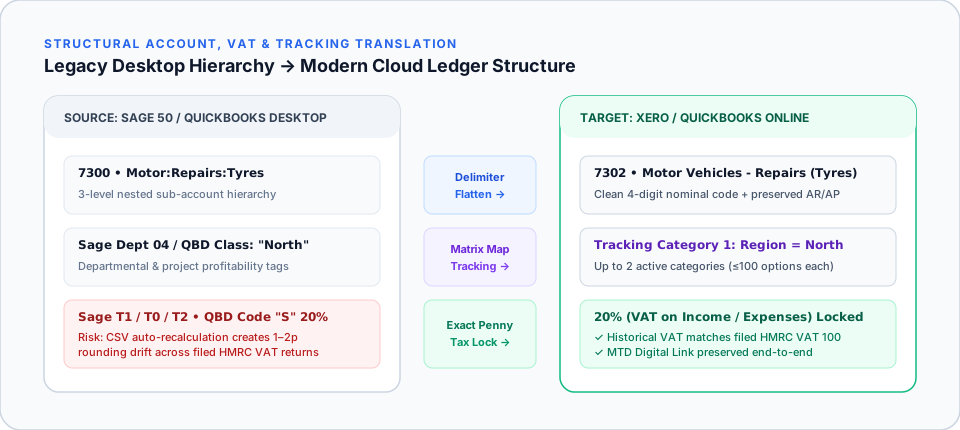
QuickBooks Desktop calculates UK VAT through nested Tax Codes and Tax Items at invoice-total or line level, whereas Xero applies global line-item Tax Rates (such as "20% (VAT on Income)", "Zero Rated Income", and "Domestic Reverse Charge"). Importing historical invoices via plain CSV forces Xero to recalculate VAT line-by-line, creating 1–2p rounding variances that throw your VAT Control Account out of alignment with filed HMRC VAT 100 returns.
In this guide (7 sections)
Key Takeaways
Quick Summary- Why pennies drift
- Invoice-level vs line-level 20% VAT rounding differs by 1p on odd net amounts (e.g. £12.47 × 3 lines); over 15,000 invoices, VAT liability drifts by £80–£300+.
- Exact tax locking
- TrustSwitch writes the exact historical recorded VAT penny figure onto each migrated transaction rather than letting Xero auto-recalculate.
- Reverse Charge & EC codes
- Post-Brexit PVA (Postponed VAT Accounting), CIS Domestic Reverse Charge, and pre-2021 EC acquisitions must map to distinct Xero tax treatments.
- Cash vs Accrual VAT
- If your business uses HMRC Cash Accounting for VAT, unpaid open invoices at cutover must retain exact tax attribution so VAT isn’t double-claimed or missed when paid.
- MTD digital link intact
- Programmatic transfer from your QBD backup into Xero satisfies HMRC VAT Notice 700/22 digital link rules with zero manual spreadsheet re-keying.
Why UK VAT Mapping Is the #1 Point of Failure in DIY Xero Imports
QuickBooks Desktop and Xero calculate UK VAT using different database models: QuickBooks Desktop combines Tax Codes (S, Z, E, O, RC) with underlying Tax Items and often rounds VAT at the invoice total, whereas Xero applies global Tax Rates to each individual line item and sums the rounded line tax. When you import historical QuickBooks invoices into Xero via standard CSV templates, Xero automatically recalculates VAT per line: creating 1p to 2p rounding discrepancies on thousands of past invoices and throwing your VAT Control Account out of balance with your filed HMRC VAT 100 returns[1].
For UK businesses moving via our QuickBooks Desktop to Xero route, locking exact historical tax amounts is mandatory to preserve statutory accuracy.
Standard UK QuickBooks Desktop to Xero VAT Mapping Table
| QuickBooks Desktop UK Code | Typical UK VAT Treatment | Target Xero UK MTD Tax Rate | Box 1–9 Return Behaviour |
|---|---|---|---|
S (Sales) | 20% Standard Rated Output VAT | 20% (VAT on Income) | Populates Box 1 (VAT) & Box 6 (Net Sales) |
S (Purchases) | 20% Standard Rated Input VAT | 20% (VAT on Expenses) | Populates Box 4 (VAT) & Box 7 (Net Purchases) |
R (Reduced) | 5% Reduced Rate (e.g. domestic fuel/energy) | 5% (VAT on Income / Expenses) | Populates Box 1/4 & Box 6/7 at 5% |
Z (Zero) | 0% Zero Rated Goods/Exports | Zero Rated Income / Zero Rated Expenses | Included in Box 6 / Box 7 net turnover |
E (Exempt) | VAT Exempt Supplies (insurance, finance, rent) | Exempt Income / Exempt Expenses | Included in Box 6 / Box 7 (excluded on FRS) |
O / N/A (Outside Scope) | Wages, HMRC tax payments, bank transfers, MOT | No VAT | Excluded from Boxes 1–9 entirely |
RC / PVA / CIS | Postponed VAT Accounting / Domestic Reverse Charge | Domestic Reverse Charge @ 20% / PVA | Self-accounts Output & Input VAT per HMRC rules[2] |
Three Hidden UK VAT Traps During Migration
1. The Zero Rated vs No VAT Box 6 & Box 7 Error
In QuickBooks Desktop, bookkeepers frequently mix Z (0% Zero Rated) and N/A (Outside Scope) because both produce £0.00 tax on an invoice. In Xero’s Making Tax Digital (MTD) VAT return[1], mapping bank transfers, payroll journals, or director drawings to Zero Rated Expenses instead of No VAT inflates Box 7 (Total Purchases) on your HMRC submission and triggers compliance queries[3].
2. Historical Temporary VAT Rates (17.5%, 15%, 12.5% Hospitality)
If you migrate a 6-to-10-year ledger (for instance, hospitality or construction firms carrying 2020–2022 Covid reduced-rate 5% and 12.5% invoices), mapping those historical invoices onto Xero’s current 20% rate destroys historical balances. Dedicated archived custom tax rates must be created first, with the exact historical tax penny figure locked on every transaction.
3. Cash Accounting vs Accrual VAT Cutover
Under the UK VAT Cash Accounting Scheme[2], VAT only becomes payable or reclaimable when the customer pays or you pay the supplier: not on the invoice date. Every unpaid open customer invoice and supplier bill at cutover must migrate into Xero as an authentic open invoice/bill with its exact tax code attached (never as a single lump-sum journal), otherwise Xero will miss the VAT when the cash settles next month.
How TrustSwitch Guarantees £0.00 VAT Control Parity
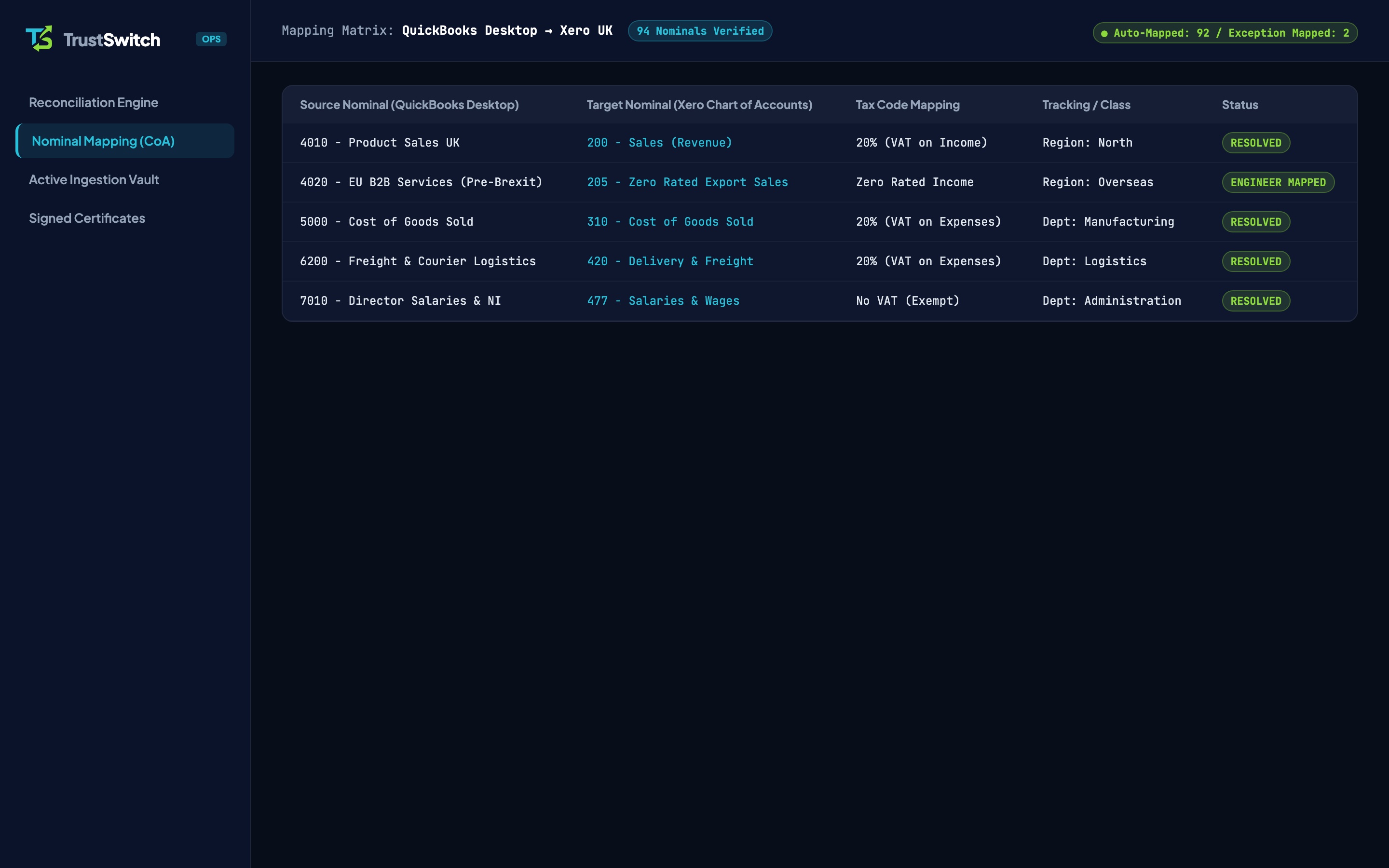
Rather than letting CSV importers overwrite your historical tax figures, TrustSwitch reads the exact recorded net and VAT amounts from your QuickBooks .QBB backup (bypassing Xero Conversion Toolbox Limits) and writes locked historical tax values into Xero. Before handover, our UK specialist verifies:
- Your Xero VAT Liability / Control Account matches QuickBooks Desktop to £0.00 variance.
- Any mid-quarter transactions produce an identical draft MTD VAT 100 return across both platforms (see MTD Compliance During an Accounting Switch).
- Every nominal code in your Chart of Accounts carries the right default Xero VAT rate going forward.
Frequently Asked Questions
How do standard QuickBooks Desktop UK VAT codes map to Xero?
What happens if an old invoice had a historical 17.5% or 15% Covid hospitality VAT rate?
Should we switch mid-VAT quarter or right after filing a VAT return?
Do I need to re-authorise Making Tax Digital in Xero after migration?
Guarantee £0.00 Variance on Your HMRC VAT Control Account
Our UK specialist maps every QuickBooks VAT code and locks historical tax pennies so your Xero ledger matches every filed VAT return.