Xero Conversion Toolbox Limits for Large QuickBooks & Sage Files (UK Guide)
Standard Xero import templates and free conversion utilities typically hit practical ceilings at 1,000 CSV rows per manual batch, two years of automated historical scope, and strict Xero daily rate limits. Splitting a multi-year QuickBooks Desktop or Sage 50 ledger into manual monthly CSV chunks routinely breaks customer payment allocations, duplicates opening balances, and creates VAT rounding drift.
In this guide (4 sections)
Key Takeaways
Quick Summary- CSV batch ceiling
- Xero’s manual CSV invoice/bill importers recommend batches under 500–1,000 rows; a 6-year UK SME ledger frequently exceeds 40,000 to 150,000 journal lines.
- 2-year free history cap
- Subsidised self-service conversion tools restrict free transfers to current year + 1 prior year, charging £60–£75 + VAT for every additional year.
- Tracking category rules
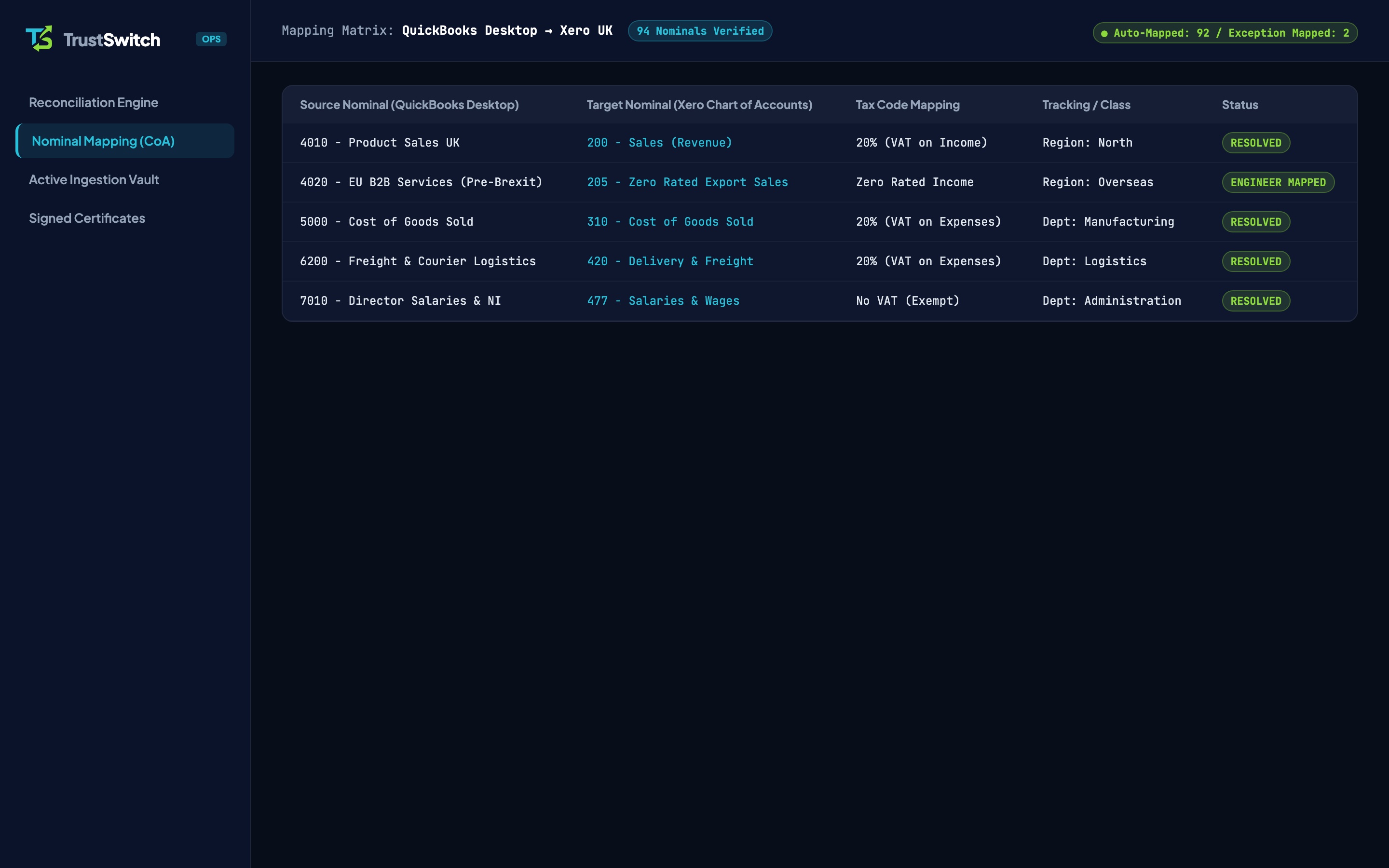
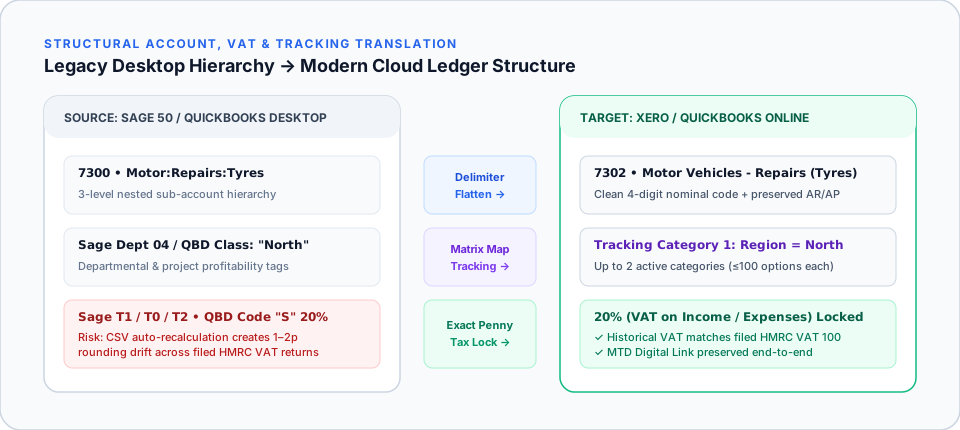
- Xero permits a maximum of 2 active Tracking Categories with up to 100 recommended options each: requiring upfront flattening of sprawling QBD Classes.
- Why CSV chunking breaks
- Importing invoices in monthly CSV slices detaches credit notes and part-payments applied in later months, corrupting Aged Receivables and Aged Payables.
- Conversion balance nuance
- Xero does not attach Tracking Categories directly to standard Conversion Balances without a reversing pre-conversion journal.
- Flat-fee full archive
- TrustSwitch migrates 3–6 years (£395 + VAT) or 7–10+ years (£595 + VAT) directly from your .QBB or .001 backup with £0.00 trial balance variance.
What Are the Practical Limits of Native Xero Import & Conversion Tools?
When moving an established UK business from QuickBooks Desktop or Sage 50 into Xero, finance teams typically collide with three hard ceilings: manual Xero CSV importers cap cleanly at 500 to 1,000 rows per file, Xero Tracking Categories allow only 2 active categories with up to 100 recommended options each[1], and Xero-subsidised automated converters cap free scope at current year plus 1 prior year. Once a company file holds 4 to 10+ years of itemised trading history, standard self-service routes either reject the file, charge steep per-year add-ons, or truncate older years into static opening balances.
If your file has already hit row timeouts or history caps, compare your options below or review our managed QuickBooks Desktop to Xero and Sage 50 to Xero services.
| Xero Import Mechanism | Practical Ceiling / Restriction | Impact on Established UK SMEs (3–10+ Yrs) |
|---|---|---|
| Xero Manual CSV Importer (Invoices / Bills) | Recommended ≤500–1,000 rows per upload; browser timeout above heavy batches | A 6-year ledger with 60,000 lines requires 60+ manual CSV slices and breaks payment links |
| Subsidised Self-Service Converters | Free tier limited to Current + 1 prior financial year | Extra historical years add £60–£75 + VAT/yr (see TrustSwitch vs Movemybooks) |
| Xero Tracking Categories | Max 2 active categories (4 total incl. archived); ≤100 options per category[1] | Unmapped QBD Classes (150+ codes) or Sage Departments fail import or slow reports |
| Xero Conversion Balances Screen | Cannot attach Tracking Categories directly to standard Conversion Balances[2] | Importing balances-only wipes out prior-year departmental Profit & Loss comparisons |
| System Control Accounts | Cannot post raw manual journals to AR, AP, Bank, or Retained Earnings | DIY balance journals create mismatches between Aged Debtors/Creditors and Balance Sheet |
Why Splitting Large Files Into Monthly "CSV Chunks" Destroys Reconciliation
When confronted with Xero’s row limit on manual CSV uploads, internal finance teams often attempt to export QuickBooks .IIF/CSV reports or Sage 50 CSV tables in monthly slices. In double-entry accounting, manual chunking introduces three severe failure points:
- Broken Cross-Period Allocations: Suppose an invoice is raised on 24 March (Chunk 3), a partial credit note is issued on 4 April (Chunk 4), and the customer pays the net balance alongside two other invoices on 19 May (Chunk 5). Flat CSV imports cannot link cross-batch allocations automatically, leaving thousands of "unpaid" ghost invoices sitting on Xero’s Aged Receivables report.
- Duplicate Contact Creation: Minor punctuation differences across CSV exports (
Acme Builders LtdvsAcme Builders Ltd.) generate duplicate supplier and customer cards in Xero, splitting statement histories in half. - Accumulated UK VAT Rounding Drift: Every uploaded CSV invoice triggers Xero’s own line-level VAT calculation. As covered in Mapping QuickBooks Desktop UK VAT Codes to Xero, 1p rounding variances across tens of thousands of historical lines throw your Xero VAT Control Account out of alignment with your submitted HMRC VAT 100 returns.
Navigating Xero’s Tracking Category & Conversion Balance Rules
According to official Xero Central documentation[1], Xero enforces strict architectural boundaries around multi-dimensional reporting:
- Two Active Categories Maximum: You can maintain up to two active categories (for example,
RegionandDepartment), with up to two additional archived categories. - 100-Option Ceiling: Xero recommends no more than 100 options per category so Profit & Loss reports calculate without browser timeouts.
- Conversion Balance Limitation: Standard opening conversion balances in Xero sit untracked[2]. If a self-service tool truncates years 3 to 6 into a single conversion balance journal, you lose multi-year departmental comparatives unless historical lines are migrated properly (see QuickBooks vs Xero Reporting & Tracking).
How TrustSwitch Migrates High-Volume Ledgers Into Xero Safely
Instead of forcing decades of data through browser CSV uploaders, TrustSwitch processes your complete .QBB or .001 backup offline in our encrypted UK staging environment:
- Direct Backup Parsing: We extract every historical invoice, bill, credit note, bank transaction, and payment allocation with full relational links intact, satisfying the 6-year statutory record obligation under Companies Act 2006 s.386[3].
- Paced Cloud Queuing: Transactions are imported cleanly within Xero’s daily rate limits while locking exact historical UK VAT amounts to the penny.
- Human Specialist Tie-Out: Before handover, a dedicated UK ledger specialist reconciles your Xero Trial Balance, Aged Receivables, Aged Payables, and VAT Control Account to £0.00 discrepancy: for a fixed flat fee of £395 + VAT (3–6 years) or £595 + VAT (7–10+ years).
The True Cost of a "DIY" Migration
Native migration tools are free, but the manual cleanup is not. Calculate your hidden costs below based on UK averages (Bookkeeper: £35/hr, Dual Licensing).
Time spent running old and new systems simultaneously.
Full double-entry transaction migration, custom nominal mapping, and £0.00 trial balance guarantee in 48–72h or scheduled Friday 5 PM to Monday 8:30 AM weekend cutover.
Frequently Asked Questions
Why does Xero restrict manual CSV imports to small row counts?
How many Tracking Categories and options does Xero support?
Is Xero slow if I import 6 to 10 years of historical transactions?
How does TrustSwitch handle a 1GB+ QuickBooks Desktop or Sage 50 backup?
Bypass Toolbox Row Limits & Extra-Year Fees
Migrate up to 6 years (£395 + VAT) or 10+ years (£595 + VAT) from QuickBooks Desktop or Sage 50 into Xero with a signed £0.00 Trial Balance Audit Certificate.