QuickBooks Desktop to Online Conversion Failed? UK Troubleshooting & Fix Guide
Native QuickBooks Desktop to QuickBooks Online conversions most commonly fail because the company file exceeds Intuit’s 350,000-target ceiling, contains broken database links inside the .QBW file, or hits UK VAT and multi-currency validation conflicts. Do not run Intuit’s Condense Data utility to force an export through, as condensing permanently strips itemised historical invoice lines required for 6-year HMRC compliance checks.
In this guide (5 sections)
Key Takeaways
Quick Summary- Press F2 first
- Open QuickBooks Desktop and press F2 (or Ctrl+1) to inspect Total Targets; any file above 350,000 targets will be rejected by Intuit’s built-in exporter.
- Never condense blindly
- Intuit’s Condense Data utility deletes historical line-item invoices and replaces them with summary monthly journals, destroying audit drill-down.
- Verify before rebuilding
- Run File > Utilities > Verify Data before Rebuild Data on a duplicate copy: never on your only master .QBW file.
- UK VAT & Flat Rate traps
- Historical Cash Accounting VAT codes and compound tax items frequently fail validation or create penny-rounding drift in QBO.
- Negative stock blockers
- Desktop files carrying negative stock quantities on historical dates will misstate inventory valuation in QBO FIFO layers unless remediated.
- Managed rescue option
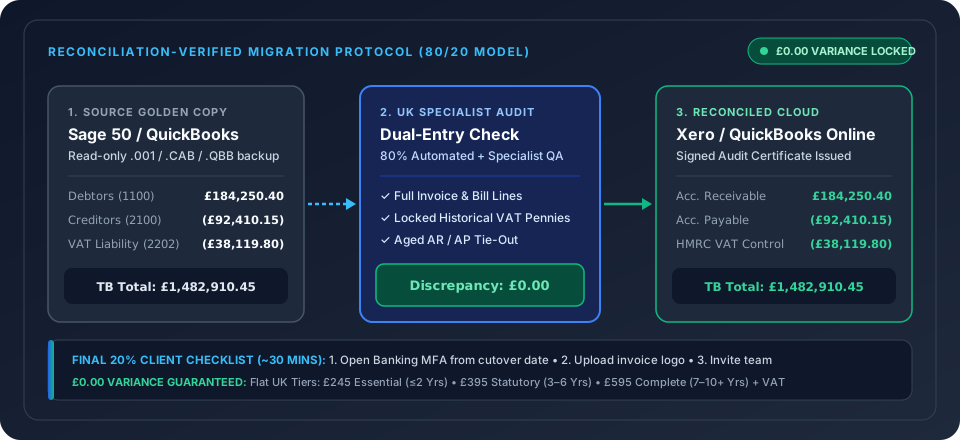
- TrustSwitch extracts directly from your .QBB backup with zero target ceiling for £245–£595 + VAT, reconciled to £0.00 trial balance variance.
Why Does Intuit’s Built-In QuickBooks Desktop Exporter Fail?
Intuit’s native "Export Company File to QuickBooks Online" utility[1] works reliably for small, recent company files, but regularly aborts, times out, or produces an out-of-balance ledger on established UK businesses with three or more years of trading history. Nearly every conversion failure traces back to one of six structural blockers: exceeding the 350,000-target limit, underlying .QBW index corruption, UK VAT scheme conflicts, negative stock layers, multi-currency home adjustments, or locked network permissions.
Before attempting destructive workarounds on your master ledger, identify your exact failure mode in the diagnostic table below, or move straight to our managed QuickBooks Desktop to QuickBooks Online Migration service.
| Error Symptom or Message | Root Technical Cause | Safe Diagnostic Check | Why DIY Workarounds Backfire |
|---|---|---|---|
| "Your file is too large to export" | File exceeds 350,000 Total Targets (individual transaction lines + list items) | Press F2 (or Ctrl+1) in QBD to view Total Targets | Running Intuit’s Condense Data permanently deletes historical invoice line items[2] |
| "There was a problem checking your company file" | Broken transaction pointers or orphaned journal links inside the .QBW database | Run File > Utilities > Verify Data and inspect QBWin.log | Repeated Rebuild Data runs on a damaged live file can drop unlinked payments |
| Export hangs at 90%–99% or times out | Oversized audit trail, attached local documents, or multi-user lock conflict | Switch to Single-User Admin mode and copy .QBW to local SSD | Re-triggering exports into the same QBO company creates duplicate nominal entries |
| VAT Control Account wrong after import | UK Cash Accounting VAT, Flat Rate adjustments, or 1–2p line-level tax recalculation | Compare QBD VAT 100 liability report against QBO Balance Sheet | Filing your next MTD return on a drifted VAT balance breaches HMRC digital accuracy[3] |
| Stock / Inventory Asset value misstated | Negative stock quantities on historical dates converted into QBO FIFO layers | Run Inventory Valuation Summary in QBD and filter for negative on-hand | Manual stock adjustment journals distort historical Cost of Sales and gross margin |
| Aged Debtors / Creditors disagree with TB | Unapplied supplier credits or foreign-currency bills re-valued at import date | Compare Aged Receivables Detail against Balance Sheet Debtors | Cleaning up thousands of unlinked AR/AP open items manually takes weeks |
1. Hitting the 350,000 Total Targets Ceiling (F2 Check)
Total file size in megabytes is rarely what stops QuickBooks Desktop from converting; Total Targets is the real gatekeeper. Inside QuickBooks Desktop, every customer, supplier, item, and individual split line on every historical invoice, bill, or cheque counts as one target. A UK wholesaler or agency raising 150 multi-line invoices a month will cross 350,000 targets in four to five years.
Why you must avoid Intuit’s Condense Data tool: When you exceed 350,000 targets, Intuit’s help prompts suggest running File > Utilities > Condense Data to delete closed historical transactions and replace them with summary monthly journal entries. For a UK limited company, condensing creates an immediate statutory headache: under Section 386 of the Companies Act 2006[2] and HMRC VAT Notice 700/22[3], you must preserve underlying transaction details for 6 years. Condensing strips customer names, invoice numbers, and VAT breakdowns from your cloud ledger, forcing you to maintain an old Windows PC just to answer historic audit queries.
The non-destructive fix: TrustSwitch bypasses Intuit’s 350,000-target desktop exporter entirely. By extracting directly from a read-only .QBB Golden Copy backup and pacing structured cloud batches, we migrate 3–6 years (£395 + VAT) or 7–10+ years (£595 + VAT) with every invoice line intact.
2. Resolving "Problem Checking Your Company File" Safely
If File > Utilities > Verify Data reports "QuickBooks detected that your data has lost integrity", never run Rebuild Data directly on your only live server file.
- Have all staff log out and switch to Single-User Mode (
File > Switch to Single-user Mode). - Save two separate
.QBBbackups (File > Back Up Company > Create Local Backup) onto an encrypted local drive. - Restore a test copy into a local folder, run
File > Utilities > Verify Data, and reviewQBWin.log(pressF2, thenF3>Open File>QBWin.log) to see whether the error is a minor list sort index or a broken payment link. - Run
Rebuild Dataon the test copy only, then compare the before-and-after Trial Balance to the penny to confirm Rebuild did not silently drop out-of-balance lines.
3. Silent Post-Conversion Failures: UK VAT, Multi-Currency & Missing Data
Even when Intuit’s progress bar reaches 100% and emails a "Congratulations" message, never allow your team to start raising live invoices until you run three mandatory reconciliation checks:
- Trial Balance Tie-Out: Run a Trial Balance on Accrual basis as of your cutover date in both QBD and QBO. Every single Balance Sheet account and Retained Earnings figure must match to £0.00.
- Aged Debtors & Creditors Tie-Out: Confirm open customer and supplier sub-ledgers match your Balance Sheet control accounts.
- What Never Moves Natively: Review our companion breakdown of What Data Does NOT Migrate from QuickBooks Desktop to Online so you export your historical Bank Reconciliation PDFs before retiring your desktop server.
Stop Retrying Into a Corrupted Cloud File
If an automated attempt has already half-populated your new QuickBooks Online company with broken balances, do not enter new transactions on top of it. Within the first 60 days of a QBO subscription, an clean purge/reset allows a fresh start: or you can consider moving to Xero instead via our QuickBooks Desktop to Xero route. Upload your .QBB backup to TrustSwitch and let a dedicated UK ledger specialist deliver a £0.00 variance cloud account over a single weekend.
The True Cost of a "DIY" Migration
Native migration tools are free, but the manual cleanup is not. Calculate your hidden costs below based on UK averages (Bookkeeper: £35/hr, Dual Licensing).
Time spent running old and new systems simultaneously.
Full double-entry transaction migration, custom nominal mapping, and £0.00 trial balance guarantee in 48–72h or scheduled Friday 5 PM to Monday 8:30 AM weekend cutover.
Frequently Asked Questions
How do I check my Total Targets in QuickBooks Desktop?
Why is Intuit’s Condense Data utility risky for UK companies?
What if the native migration succeeded, but my Trial Balance in QBO is wrong?
Can TrustSwitch convert a QuickBooks UK file with 10+ years of history?
Export Failed or Exceeded 350,000 Targets? Stop Forcing It.
Upload your read-only .QBB backup to our encrypted UK vault. We extract all historical years without condensing and verify your QBO Trial Balance to £0.00 discrepancy.